共享模型路径(extra_model_paths.yaml)
通过
extra_model_paths.yaml配置文件,让 ComfyUI 识别ComfyUI/models之外的模型文件。
如果你想要在 ComfyUI/models 之外管理你的模型文件,可能出于以下原因:
- 你有多个 ComfyUI 实例,你想要让这些实例共享模型文件,从而减少磁盘占用
- 你有多个不同的类型的 GUI 程序,如:WebUI, 你想要他们共用模型文件
- 模型文件无法被识别或读取到
我们提供了通过 extra_model_paths.yaml 配置文件来添加额外模型搜索路径的方法。
不同 ComfyUI 版本配置文件位置
- 便携版及手动安装
- Comfy Desktop
对于便携版和手动安装的 ComfyUI版本,你可以在 ComfyUI 的根目录下找到 extra_model_paths.yaml.example 的示例文件
ComfyUI/extra_model_paths.yaml.example
复制并重命名为 extra_model_paths.yaml 来使用, 并保持在 ComfyUI 的根目录下, 路径应该是 ComfyUI/extra_model_paths.yaml
你也可以在 这里 找到配置示例文件
如果你使用的是 ComfyUI 桌面应用程序,你可以参考下图打开额外模型的配置文件:
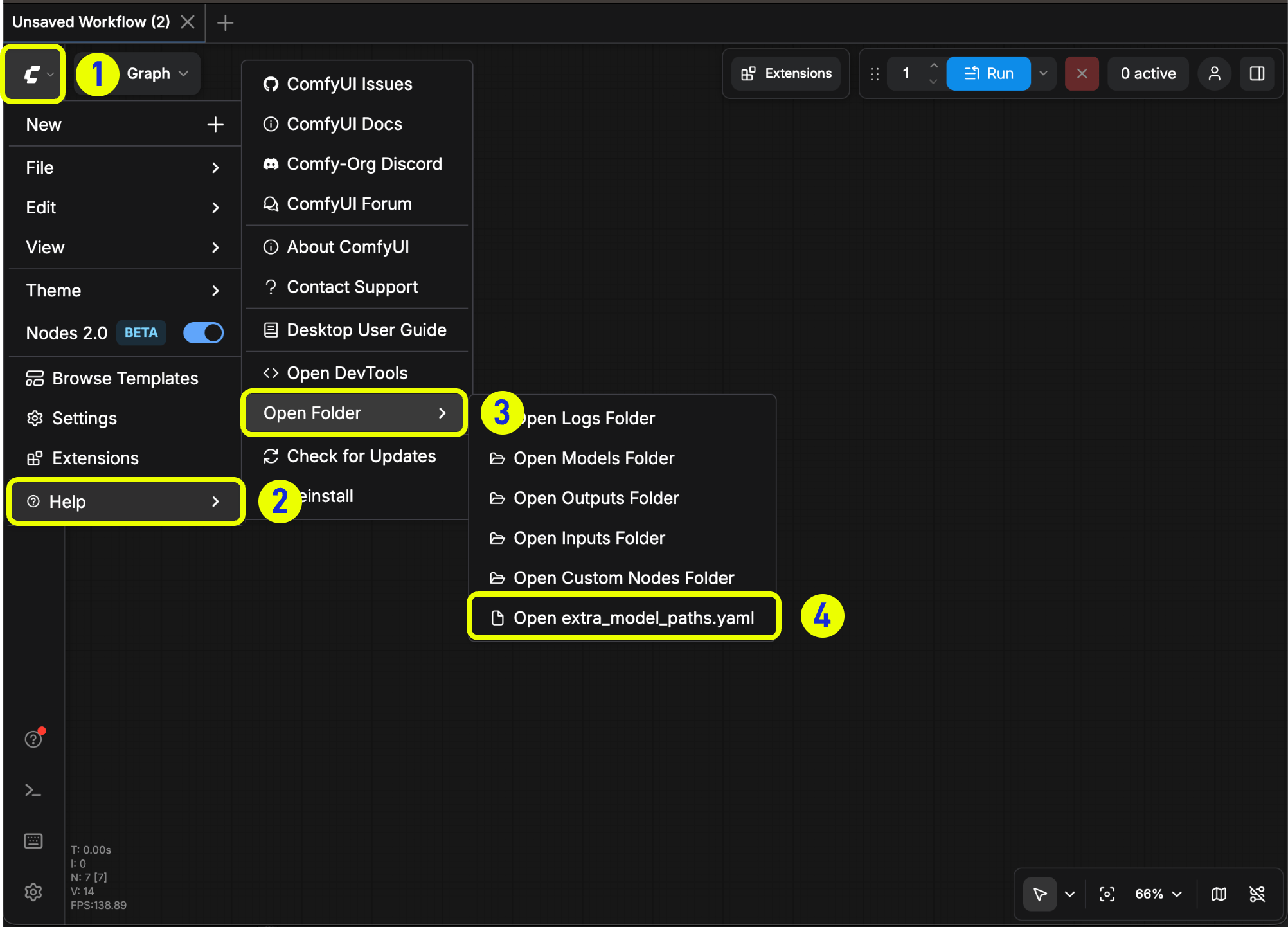
或者通过下面的位置打开:
- Windows
- macOS
C:\Users\YourUsername\AppData\Roaming\ComfyUI\extra_models_config.yaml
~/Library/Application Support/ComfyUI/extra_models_config.yaml
对应的配置文件不应该被改变
配置示例
比如,你需要额外让 ComfyUI 识别的模型文件位于下面的文件夹:
📁 YOUR_PATH/
  ├── 📁models/
  |   ├── 📁 loras/
  |   │   └── xxxxx.safetensors
  |   ├── 📁 checkpoints/
  |   │   └── xxxxx.safetensors
  |   ├── 📁 vae/
  |   │   └── xxxxx.safetensors
  |   └── 📁 controlnet/
  |       └── xxxxx.safetensors
那么你可以进行如下的配置来让 ComfyUI 识别到你设备上的模型路径
my_custom_config:
    base_path: YOUR_PATH
    loras: models/loras/
    checkpoints: models/checkpoints/
    vae: models/vae/
    controlnet: models/controlnet/
或者使用
my_custom_config:
    base_path: YOUR_PATH/models/
    loras: loras
    checkpoints: checkpoints
    vae: vae
    controlnet: controlnet
对于桌面版,请在原有配置路径下新增配置,而不覆盖掉安装过程中自动生成的路径配置,请在修改前备份对应的文件,这样在你配置错误时可以及时恢复
或者你也可以参考默认的 extra_model_paths.yaml.example 来配置,保存之后, 需要 重启 ComfyUI 才能生效。
下面是完整的原始的配置配置示例:
#Rename this to extra_model_paths.yaml and ComfyUI will load it


#config for a1111 ui
#all you have to do is change the base_path to where yours is installed
a111:
    base_path: path/to/stable-diffusion-webui/

    checkpoints: models/Stable-diffusion
    configs: models/Stable-diffusion
    vae: models/VAE
    loras: |
         models/Lora
         models/LyCORIS
    upscale_models: |
                  models/ESRGAN
                  models/RealESRGAN
                  models/SwinIR
    embeddings: embeddings
    hypernetworks: models/hypernetworks
    controlnet: models/ControlNet

#config for comfyui
#your base path should be either an existing comfy install or a central folder where you store all of your models, loras, etc.

#comfyui:
#     base_path: path/to/comfyui/
#     # You can use is_default to mark that these folders should be listed first, and used as the default dirs for eg downloads
#     #is_default: true
#     checkpoints: models/checkpoints/
#     clip: models/clip/
#     clip_vision: models/clip_vision/
#     configs: models/configs/
#     controlnet: models/controlnet/
#     diffusion_models: |
#                  models/diffusion_models
#                  models/unet
#     embeddings: models/embeddings/
#     loras: models/loras/
#     upscale_models: models/upscale_models/
#     vae: models/vae/

#other_ui:
#    base_path: path/to/ui
#    checkpoints: models/checkpoints
#    gligen: models/gligen
#    custom_nodes: path/custom_nodes
添加额外自定义节点路径
除了添加外部模型之外,你同样可以添加不在 ComfyUI 默认路径下的自定义节点路径
请注意,这并不会改变自定义节点的默认安装路径,只是在启动 ComfyUI 时会增加额外的路径搜索,你仍旧需要在对应的环境中完成自定义节点的依赖的安装,来保证其运行环境的完整性。
下面是一个简单的配置示例(Mac 系统),请根据你的实际情况进行修改,并新增到对应的配置文件中,保存后需要 重启 ComfyUI 才能生效:
my_custom_nodes:
  custom_nodes: /Users/your_username/Documents/extra_custom_nodes